
Core workflow
Check the release before installing
As checked on 22 September 2026, the linked node repository is archived. Its Scash 2.0.0 / Core 27.0.0 release provides Linux x86-64 and Windows 64-bit downloads, with SHA-256 hashes in the release notes. This is a record of those published packages, not a claim of current maintenance.
- Select the matching package.
Use the node release for your operating system and architecture. A macOS miner package does not provide a macOS wallet; the linked node release has no macOS package.
- Verify the archive or installer.
Compare its SHA-256 digest with the release notes before extracting or installing. Linux users can run
sha256sum FILE.tgz; Windows users can runGet-FileHash .\FILE.exe -Algorithm SHA256in PowerShell, replacing the example filename. - Start the node and confirm the network.
The graphical program is
scash-qt(orscash-qt.exe); command-line operation usesscashdandscash-cli. Check that you selected Scash mainnet and allow the node to synchronize before relying on balances or mining work.
Create a wallet and receiving address
In the graphical application, choose File → Create Wallet, select wallet encryption, and keep the passphrase securely offline. Use the Receive tab to request an address. The wallet documentation describes the corresponding wallet operations; some examples retain upstream Bitcoin names and paths, so use the names and data directory of your Scash installation.
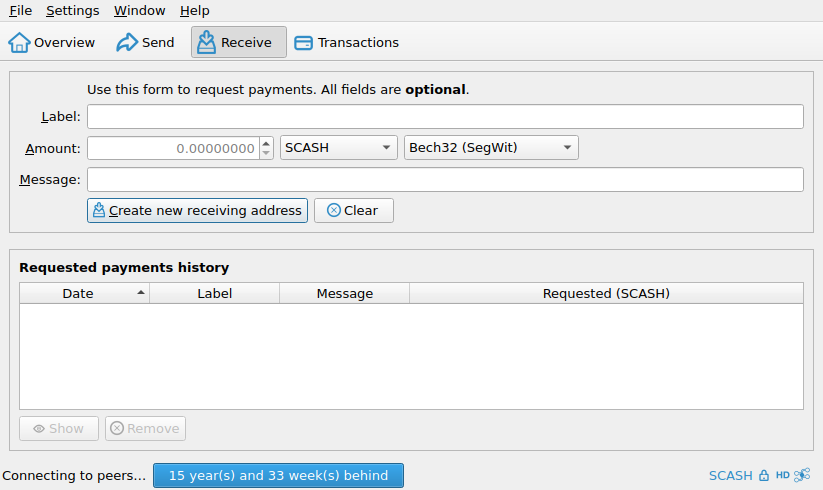
You can use the graphical wallet or the command line. A typical command-line workflow begins by creating a named wallet and requesting a new address:
scash-cli createwallet "main"
scash-cli -rpcwallet=main getnewaddress
Copy addresses carefully and compare the beginning and end before using them. For a meaningful payment, verify the complete address through a second trusted channel or on the signing device.
Back up after meaningful wallet changes
Use File → Backup Wallet after creating or encrypting a wallet. For command-line backups, supply an absolute destination including a filename:
scash-cli -rpcwallet=main backupwallet "/ABSOLUTE/OFFLINE/PATH/main-backup.dat"The destination must exist and be writable by the node process. Restore a test copy under a different wallet name with restorewallet, then inspect it with getwalletinfo. Do not overwrite your only working wallet or backup.
Verification: wallet creation, encryption, address generation, backup, and restoration were exercised with the checksum-verified Linux x86-64 Scash 2.0.0 release on 22 September 2026. The test used an isolated Scash regression-test chain with no funds or network peers; it does not verify mainnet synchronization, Windows operation, or software security.
Follow the wallet documentation for the wallet type in your installed release. Keep backups offline, label them without exposing sensitive information, and protect them from device failure, theft, fire, and accidental deletion.
- Never share private material. Support volunteers, miners, pools, and exchanges do not need your private keys or wallet file.
- Do not rely on one device. A wallet stored only on the computer that uses it is not a backup.
- Test with a small amount. Confirm receiving, backup, restoration, and spending before storing significant value.
- Keep software current deliberately. Read release notes and back up before upgrading rather than installing unsolicited update links.
Receiving mining rewards
Generate a dedicated address and use it as the coinbase address for solo mining or the payout address required by a pool. Avoid mining directly to an exchange deposit address unless that exchange explicitly documents support for the payout method.